
Artwork and Proof Approval Guide
Send us your logo or artwork along with the product you want to order and where you want the design placed. Our team can review your file for the selected product and explain any changes needed before you approve the proof.
Use this guide to prepare your artwork for Logo Expressions and check your design before production. If you are unsure which file to send, share what you have and ask us to review it.
Prepare Your Artwork With Us
- Send your file and order details. Include your product or order reference, preferred logo location, colors and required delivery date. If your design uses fonts or separate image files, include those or ask your designer to prepare the complete artwork.
- Review any file changes. We will check whether your artwork is suitable for the product and decoration method. If it needs to be redrawn or converted to vector artwork, ask us to confirm the work, cost and timing before proceeding.
- Agree on size and placement. Review the available print area, decoration method and color requirements with us. Tell us about any brand guidelines or details that must remain readable.
- Check your proof. Review the design, dimensions, placement, colors and text. Send any corrections together and ask to see the revised proof before giving your approval.
- Approve the final version. Make sure the person responsible for your order approves the correct proof. Keep a copy with your order details so your team has a clear reference for what was approved.
- Confirm the schedule. Check the production and delivery timing with us after your artwork and order details are approved. Let us know immediately if you need to request a change.
What to Send and What to Confirm
These points summarize our artwork requirements. Your selected product and decoration method determine which files and settings will work.
| Item | What to Send | What to Review With Us |
|---|---|---|
| Vector logo | Your original .ai, .eps, .pdf or .svg file, with fonts included or text converted to outlines. | Whether the file contains usable vector artwork. A PDF or EPS can still contain pixel images. |
| Photos and pixel images | Your original high-resolution file, at a minimum of 150 dpi at the final printed size. Keep layers intact where possible. | Whether the resolution and format suit your product. Some products require vector artwork. |
| Brand colors | Your color specifications, including Pantone references if your brand uses them. | The available color process and matching options for your item. Screen colors alone are not a reliable print-color reference. |
| Logo placement | Your preferred location and any size requirements. | The product's available print area, artwork dimensions and any seams, curves or edges affecting placement. |
| Artwork changes | The best source file you have and a description of the changes you need. | Any redraw or conversion work, its cost and the proof you will review afterward. |
| Proof approval | Your corrections or approval of the final proof, using the instructions supplied with it. | The exact artwork version, design, location, dimensions, colors and text being approved. |
| Samples | What you want to assess, such as product feel, fit, decoration or color. | Whether a suitable sample is available, what it includes, and its cost and effect on your schedule. |
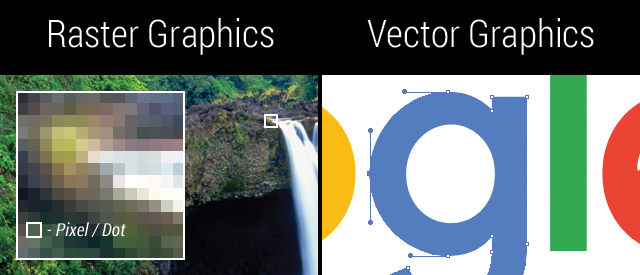
Why your original logo file helps: Vector artwork can be resized while keeping its edges clean. A pixel image has a fixed amount of detail and may look blurry when enlarged. Saving a small image as a PDF does not turn it into vector artwork.
Check These Details on Your Proof
- Correct item: the product and color you selected.
- Correct artwork: your current logo and the latest design.
- Text: names, dates, contact details and spelling.
- Size: the stated dimensions of your printed or decorated design.
- Placement: the correct side, panel or garment location.
- Colors: your agreed color references and decoration method.
A digital proof helps you review the layout, but your screen cannot show the exact feel, texture or printed color of the finished product. If those details are critical to your order, ask us about an appropriate sample and any extra time or cost.
Send Your Files
Email files up to 25 MB to [email protected]. For larger files, share a cloud-storage link with the same address and make sure our team can open it. Include your product or order reference and a contact for artwork questions.
See our file delivery instructions for more details. Sending a file gives us something to review; approve your final proof separately before production.
Artwork and Ordering Resources
- Accepted file formats
- Color guidance
- Decoration methods
- Help Center and sample information
- Rush products
- Shipping information
Get Help With Your Artwork
Tell us which product you are considering and share your available artwork. We can review the file, discuss your logo placement and explain the next steps for your proof.